
Kwikset Smart Lock Installation San Antonio — What Does Professional Service Actually Include?
Homeowners across San Antonio are upgrading to keyless entry at a rapid pace, and for good reason. Smart locks offer convenience, flexible access control, and modern security features that traditional deadbolts simply cannot match. Whether you are managing a busy household, renting out property, or just tired of fumbling for keys, a Kwikset smart lock can simplify your daily routine. The three most popular models — Kwikset Halo, Kwikset Kevo, and Kwikset Aura — each serve different needs, but they all share one critical requirement: precise installation.
While DIY installation is possible, professional Kwikset smart lock installation San Antonio TX ensures the hardware is aligned perfectly with both the door and the frame. This alignment step is the single biggest factor in preventing motor errors, bolt jams, and premature battery drain. Our residential locksmith services cover the full scope of this work — removing your old deadbolt, verifying door thickness and bore-hole dimensions, installing the smart lock, calibrating the motor, and walking you through the first lock-and-unlock cycle so you see it working smoothly before we leave.
Which Kwikset Model Fits Your Door and Your Lifestyle?
Choosing between Halo, Aura, and Kevo depends on how you want to interact with your lock day-to-day and what level of remote access you need. Below is a practical comparison to help you decide before scheduling installation.
| Feature | Kwikset Halo | Kwikset Aura | Kwikset Kevo |
|---|---|---|---|
| Connectivity | Wi-Fi (no hub required) | Bluetooth (newer Aura Reach models add Matter support) | Bluetooth with optional gateway for remote access |
| Remote Lock/Unlock | Yes, via Kwikset App over Wi-Fi | Local only via Bluetooth (unless using Matter-compatible hub) | Yes, with Kevo Plus gateway |
| Primary Entry Method | Keypad codes and app | Keypad codes and app | Touch-to-Open with smartphone or calibrated fob |
| Best For | Homeowners who want full remote control without extra hardware | Budget-conscious users who need Bluetooth-range management | Users who prefer hands-free entry without tapping a keypad |
| Physical Key Backup | Yes (SmartKey Security cylinder) | Yes (SmartKey Security cylinder) | Yes (SmartKey Security cylinder) |
The Kwikset Halo connects directly to your home Wi-Fi router, so you can lock or unlock from anywhere through the Kwikset App. The Kwikset Aura operates over Bluetooth, keeping things simpler — and the newer Aura Reach variant introduces Matter integration for broader smart-home compatibility. The Kwikset Kevo takes a different approach entirely with its Touch-to-Open technology: just touch the lock while your phone or fob is nearby, and the deadbolt responds.
What Makes a Kwikset Aura Install Different from Other Models?
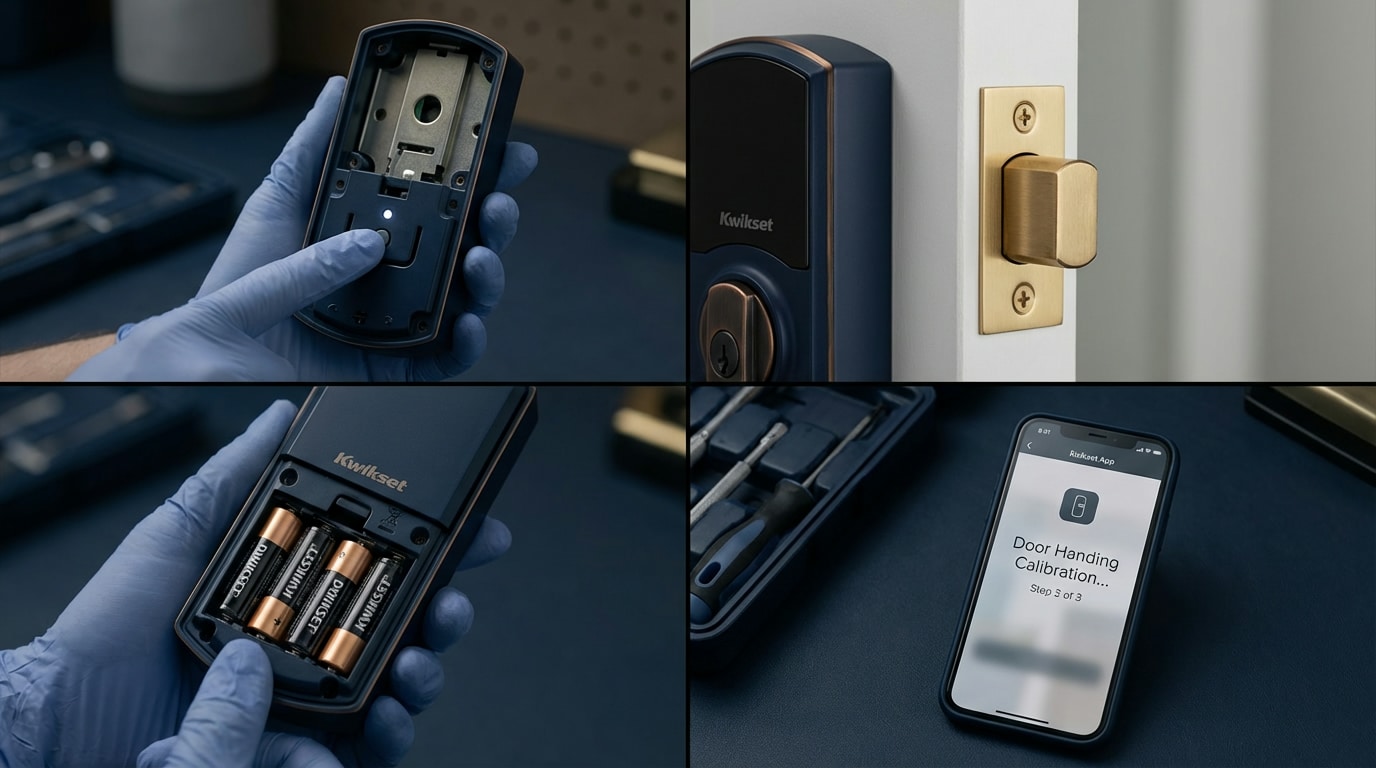
A clean Kwikset Aura install centers on one critical calibration step that many DIY installers skip or rush: the door handing process. When you insert the batteries, the lock attempts to learn whether your door is left-handed or right-handed. It does this by running the motor in both directions and measuring resistance. If the door or frame has even slight misalignment, this automatic process can fail silently — the lock appears installed, but it struggles every time the deadbolt extends.
After handing is complete, user codes are managed through the Kwikset App for both Aura and Halo models. A professional installer will verify that handing succeeded by running multiple lock-and-unlock cycles with the door closed, watching for hesitation or unusual motor sounds. At Immediate Response Locksmith, we also test the physical key backup to make sure the SmartKey cylinder turns freely, because a smart lock should always have a reliable manual fallback.
How Long Does It Take to Install a Kwikset Smart Lock?
A standard swap — removing an old deadbolt and installing a Kwikset smart lock into an existing, properly sized bore hole — typically takes 30 to 60 minutes. That time frame includes mechanical installation, door handing, motor calibration, code setup, and a final test with the door closed. If your door needs adjustments, the appointment may run longer. Common time-adding factors include an undersized strike-plate hole, a door that has settled on its hinges, or weatherstripping that interferes with the bolt path.
One advantage of working with a mobile locksmith team is that we arrive with the tools needed to handle these adjustments on the spot — chisels for strike-plate recessing, drill bits for deepening the bolt hole, and shim materials for hinge correction. You get a finished, working lock in a single visit rather than discovering mid-install that you need a trip to the hardware store.
Can You Install a Smart Lock on Any Front Door in San Antonio?
Most standard exterior doors in San Antonio accept Kwikset smart locks without modification. The key requirements are a door thickness between 1-3/8 inches and 2 inches, a standard 2-1/8 inch bore hole, and a backset of either 2-3/8 or 2-3/4 inches. If your home was built in the last several decades, these dimensions are almost certainly correct.
The real question is not whether the lock fits the hole, but whether the door closes cleanly enough for the deadbolt to extend without resistance. Here is a quick self-check: close your front door gently — do not push or pull — and try turning the thumbturn to lock the existing deadbolt. If you have to apply pressure to the door to get the bolt to slide in, the frame or strike plate needs attention before any smart lock goes on. An electronic motor is far less forgiving of friction than your hand is.
A Scenario Every San Antonio Homeowner Should Recognize: “It Only Locks If I Pull the Door Tight”
This is the single most common complaint we hear after a DIY smart lock installation. The lock seems to work on the bench or with the door open, but once the door is closed, you have to pull or push it to get the deadbolt to extend fully. On a traditional deadbolt you might tolerate this — you just give the door a tug. On a smart lock, this friction triggers a “bolt jam” error, flashes red lights, beeps, and drains your batteries in weeks instead of months.
The cause is almost always mechanical: the bolt is hitting the edge of the strike-plate hole, or the hole in the frame is not deep enough. Kwikset’s own support documentation specifies that the strike-plate hole needs at least one inch of depth for the bolt to seat properly. A professional installer checks this before powering up the lock, saving you the frustration of repeated jam errors.
What Is “Door Handing” and Why Does It Cause So Many Problems?
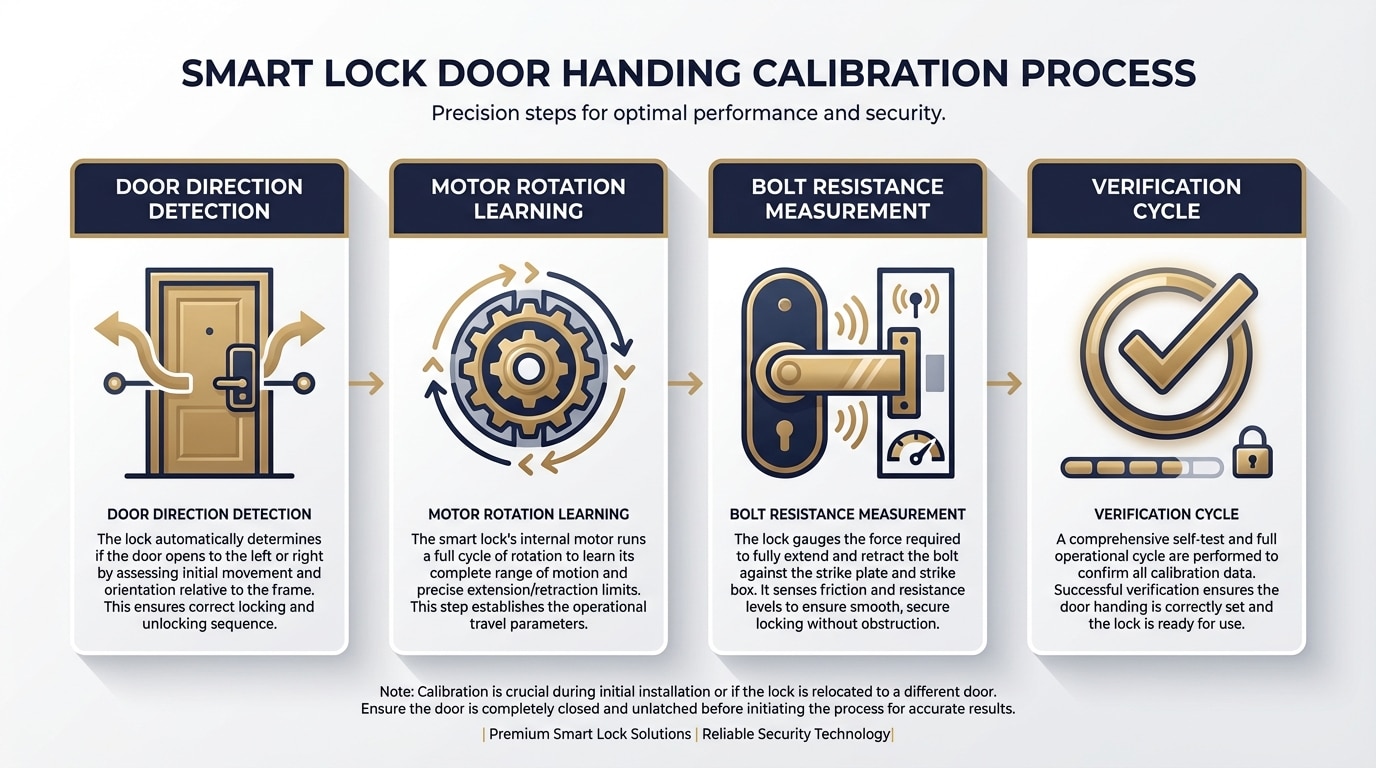
Door handing is the calibration process where the smart lock’s motor learns which direction to rotate in order to extend and retract the bolt. Every Kwikset smart lock model performs some version of this step, either automatically when batteries are first inserted or through a manual button sequence. If handing fails or is skipped, you will see symptoms that look electronic — the motor stutters, the lock partially extends and retracts, or the keypad accepts the code but nothing happens — even though the root cause is mechanical.
The most reliable way to ensure handing succeeds is to confirm zero resistance on the bolt before you initiate the process. That means the bolt must slide freely with the door closed, the strike plate must be properly aligned, and no weatherstripping should be pinching the door edge. When our technicians perform a Kwikset smart lock installation San Antonio TX, we treat handing as a verification step, not just a setup step — if handing stutters, we stop and fix the alignment before proceeding.
Troubleshooting the “Jammed” Alert: Common Mistakes and Quick Checks
A “jammed” notification or red LED flash is your Kwikset smart lock telling you the motor encountered more resistance than expected. Before assuming the lock is defective, run through these diagnostic checks in order.
| Check | What to Do | What It Tells You |
|---|---|---|
| Lock with door open | Enter a valid code or use the app while the door is standing open | If the bolt extends and retracts smoothly, the lock hardware is fine — the problem is door/frame alignment |
| Manual thumbturn with door closed | Turn the interior thumbturn by hand with the door latched shut | If you feel resistance or grinding, the strike plate or frame needs adjustment |
| Strike-plate hole depth | Measure the hole in the door frame where the bolt enters | If it is less than one inch deep, the bolt bottoms out and the motor stalls |
| Mounting screw tension | Check that the lock’s mounting screws are snug but not overtightened | Over-tightened screws can warp the lock body and bind the bolt mechanism |
| Battery level | Replace with fresh, name-brand AA batteries | Low or mixed-chemistry batteries cannot deliver enough current for the motor under load |
These same troubleshooting principles apply to business properties as well. If you manage a commercial space in San Antonio and your smart locks are throwing jam errors, our commercial locksmith solutions cover alignment correction, recalibration, and multi-lock setups across your facility.
Do You Need Wi-Fi or Internet to Set Up a Kwikset Smart Lock?
It depends on the model and which features you plan to use. The Kwikset Halo requires a Wi-Fi connection for its core remote-access features — locking, unlocking, and managing codes from anywhere through the app. Without Wi-Fi, the Halo still functions as a keypad deadbolt, but you lose the “smart” capabilities that likely motivated the purchase.
The Kwikset Aura operates over Bluetooth, so initial setup and code management happen through your phone when you are standing near the lock. No internet connection is required for that local control. The Kevo similarly uses Bluetooth for its Touch-to-Open feature, though adding the optional Kevo Plus gateway extends control to remote access over your home network. Before your installation appointment, it helps to decide whether you need keypad-only access or full remote management — this determines which model is right and whether any network configuration is part of the install.
Texas Rental Property Rules That Affect Smart Lock Choices
If you own or manage rental property in San Antonio, smart locks are not just a convenience upgrade — they can simplify your legal obligations. Under Texas Property Code Chapter 92, landlords must provide specific security devices on exterior doors, including a keyless bolting device and a door viewer. Additionally, under Texas Property Code Section 92.156, key-operated security devices must be rekeyed no later than the seventh day after each tenant turnover.
With a traditional deadbolt, rekeying means scheduling a locksmith visit between every tenant. With a Kwikset smart lock, you can reset access codes digitally — removing the old tenant’s codes and creating new ones — often without a service call. For property managers handling multiple units across San Antonio, this translates into real time and cost savings at every turnover. When physical rekeying of the backup key cylinder is still required, Immediate Response Locksmith can handle that alongside a code reset in a single visit.
What Happens If the App Can Lock But Cannot Unlock?
This frustrating one-directional behavior typically traces back to one of two issues. First, the bolt may have just enough clearance to extend into the strike hole but not enough to retract cleanly — the return path scrapes against the frame, creating enough resistance to stall the motor. Second, the door handing calibration may have partially completed, teaching the lock the correct extension direction but not the retraction direction.
The fix starts with the same manual test: close the door and try operating the thumbturn by hand in both directions. If retraction feels tighter than extension, the strike plate or frame needs adjustment. If both directions feel smooth manually, re-run the handing/calibration process with fresh batteries. On the Kevo specifically, recalibrating the fob position after correcting alignment issues is an additional step many homeowners overlook.
How Professional Installation Protects Your Battery Life
One of the less obvious benefits of professional Kwikset smart lock installation is extended battery life. Every time the motor encounters resistance — even slight friction that you might not notice — it draws more current. Over weeks and months, this adds up dramatically. A lock installed on a perfectly aligned door with a properly recessed strike plate can run for a year or more on a single set of batteries. The same lock on a slightly misaligned door might burn through batteries in eight to twelve weeks.
Our installers pay close attention to this during every job. We test the current draw indirectly by listening to the motor speed: a lock that sounds slow or strained during the final test gets additional frame adjustment until the cycle sounds clean and fast. This attention to detail is one practical reason homeowners in San Antonio choose professional installation over a weekend DIY project.
Comparing DIY Installation Risks Against Professional Service
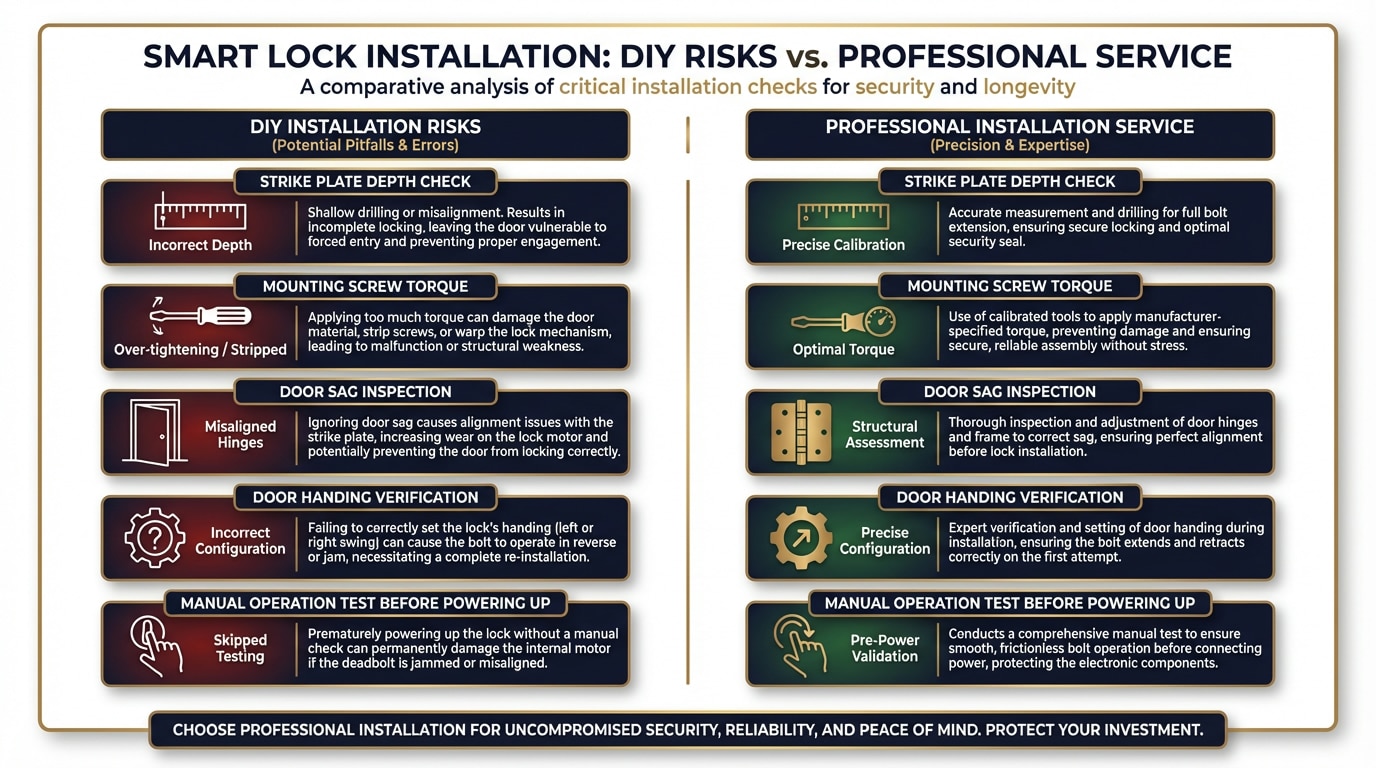
There is nothing wrong with installing a smart lock yourself if you have experience with door hardware and access to the right tools. However, the most common DIY pitfalls are not about the lock itself — they are about the door. Homeowners who have never measured backset distance, checked frame square, or deepened a strike-plate mortise often run into problems that look like lock defects but are actually prep failures.
| Common DIY Risk | What Goes Wrong | How Professional Installation Prevents It |
|---|---|---|
| Skipping strike-plate depth check | Bolt bottoms out, triggering jam errors | Installer measures and deepens the hole to at least 1 inch before mounting |
| Over-tightening mounting screws | Lock body warps slightly, binding the bolt | Installer uses calibrated torque to keep components aligned |
| Ignoring door sag | Lock works on day one but jams after seasonal wood expansion | Installer checks hinge tightness and adjusts for current conditions |
| Rushing door handing | Calibration fails silently, causing intermittent electronic errors | Installer verifies handing with multiple closed-door cycles |
| No manual-operation test before powering up | Motor fights mechanical resistance from the first cycle | Installer confirms smooth manual bolt travel before inserting batteries |
Need a Kwikset Smart Lock Installed Right?
Licensed technicians available 24/7 across San Antonio. One visit. Done right.
Is a Clicking Noise Normal When the Lock Operates?
A brief, consistent clicking or whirring sound during the lock-and-unlock cycle is normal — that is simply the motor and gears doing their job. What is not normal is a loud, grinding click followed by the bolt failing to move, or a rapid series of clicks that ends with a red LED flash. Those sounds indicate the motor is trying to turn but hitting mechanical resistance.
If you hear abnormal clicking within the first few days of installation, do not ignore it. The motor is working harder than designed, and continued use under those conditions can shorten its lifespan. A quick service call to correct alignment now is far less expensive than replacing the entire lock assembly later.
Can You Rekey a Kwikset Smart Lock to Match Your Existing House Key?
Yes. All three Kwikset smart lock families — Halo, Aura, and Kevo — use SmartKey Security technology, which allows the lock cylinder to be rekeyed to a different key without removing the lock from the door. This means your smart lock’s physical backup key can match your other Kwikset-equipped doors, giving you a single key for the entire house alongside your digital codes.
Rekeying is a separate step from electronic setup and requires a specific SmartKey tool plus the current functioning key. During a professional installation, we handle rekeying as part of the visit so you walk away with both digital access and a matched physical key — no second appointment needed. This integrated approach is especially useful for families juggling multiple entry points and wanting one backup key for emergencies.
Local Security Context: What Bexar County Recommends for Exterior Doors
The Bexar County Constable’s home security checklist recommends that all exterior doors have a deadbolt with at least a one-inch throw — the distance the bolt extends into the frame. Every current Kwikset smart lock meets this standard. The checklist also emphasizes that the door frame itself must be solid enough to resist forced entry, which means reinforced strike plates and three-inch screws anchoring into the wall stud, not just the door jamb.
When we install a smart lock, we check whether the existing strike plate and screws meet these local recommendations. If they do not, we can upgrade the strike plate and hardware during the same visit. Smart technology only works as well as the physical structure supporting it.
Frequently Asked Questions
How much does Kwikset smart lock installation cost in San Antonio?
The cost depends on the condition of your door and frame. A straightforward swap on a well-aligned door with a standard bore hole is less expensive than an installation that requires frame adjustments, strike-plate deepening, or hinge correction. Contact us at (210) 619-3986 for a specific quote based on your door’s current setup.
Can a locksmith install and program a Kwikset smart lock in one visit?
Yes. A qualified locksmith handles mechanical installation, door handing calibration, user code programming, and final testing all in a single appointment. If rekeying is needed to match your other doors, that is included in the same visit as well.
Will my Kwikset smart lock still work during a power or internet outage?
Smart locks run on batteries, not household electricity, so a power outage does not affect them. If your internet goes down, Wi-Fi models like the Halo lose remote access, but the keypad and physical key backup continue to function normally.
Do I need to replace my entire door to install a smart lock?
In the vast majority of cases, no. If your door has a standard deadbolt bore hole and meets the thickness requirements (1-3/8 to 2 inches), a smart lock installs directly into the existing hardware location. Only doors with non-standard configurations or structural damage would need replacement or significant modification.
Can I install a Kwikset smart lock on my apartment door in San Antonio?
Tenants should get written landlord approval before modifying door hardware. However, Texas Property Code Section 92.156 actually requires landlords to provide a keyless bolting device on exterior doors of rental units. If your apartment lacks one, you may have grounds to request an upgrade. A smart lock with a physical key backup can satisfy both the tenant’s desire for keyless entry and the landlord’s obligation under state law.
What should I do if my Kwikset lock shows a red light and beeps?
A red LED flash paired with beeping is a bolt-jam alert. Test the lock with the door open first. If it works fine open but fails closed, the issue is door or frame alignment — not the lock electronics. Check the strike-plate hole depth, hinge tightness, and whether the door closes flush without being forced. If adjustments do not resolve the issue, call (210) 619-3986 for a diagnostic visit.
Ready to Upgrade Your Front Door Security?
If you are considering a Kwikset smart lock for your San Antonio home or rental property, professional installation eliminates the guesswork and gives you a lock that works reliably from day one. Whether you need a Halo, Aura, or Kevo installed — or you are dealing with a jam error on an existing smart lock — Immediate Response Locksmith is ready to help with fast, affordable service. Reach out today through our contact page to schedule your appointment or get a quick quote over the phone. Learn more about our team and why San Antonio homeowners trust us with their security.
Ready to Get Started?
15+ years serving San Antonio. Licensed and insured. One call, one visit, done right.