
Yale Smart Lock Installation San Antonio — Professional Setup, Programming, and Same-Day Service
Businesses across San Antonio are moving away from traditional keys and toward keyless entry systems that offer better access control, audit tracking, and day-to-day convenience. A Yale smart lock installation gives commercial property owners the ability to manage who enters their building, when they enter, and how access is revoked — all without duplicating a single physical key. The shift matters because lost or copied keys remain one of the most common security gaps for offices, retail stores, and multi-tenant properties. According to the Texas Department of Insurance, maintaining strong physical security measures like quality deadbolts is a foundational step that can even influence insurance considerations. A Yale smart lock setup builds on that foundation with programmable codes, optional remote access, and activity logs that tell you exactly who opened the door and when.
Why Choose Yale Smart Locks for Your Business?
The Yale Assure lock series is built for environments where a door sees heavy daily traffic. Unlike basic residential hardware, these locks are designed to handle repeated cycling without degraded performance. For a San Antonio office or storefront, that translates into fewer mechanical failures and lower long-term maintenance costs. The Yale keypad lock variant lets each employee use a unique code, which means you always know who accessed the building — and you can deactivate a code instantly when someone leaves the company.
Standard deadbolts require you to rekey or change locks every time a key goes missing. With a Yale smart lock setup, you change a code in seconds. That difference saves time and money, especially for businesses with seasonal staff, cleaning crews, or multiple managers who need access at different hours. If your property requires professional-grade security planning, commercial locksmith services in San Antonio ensure the hardware is matched to the door, the frame, and the daily demands of your operation.
What Does a Yale Smart Lock Installation Actually Include?
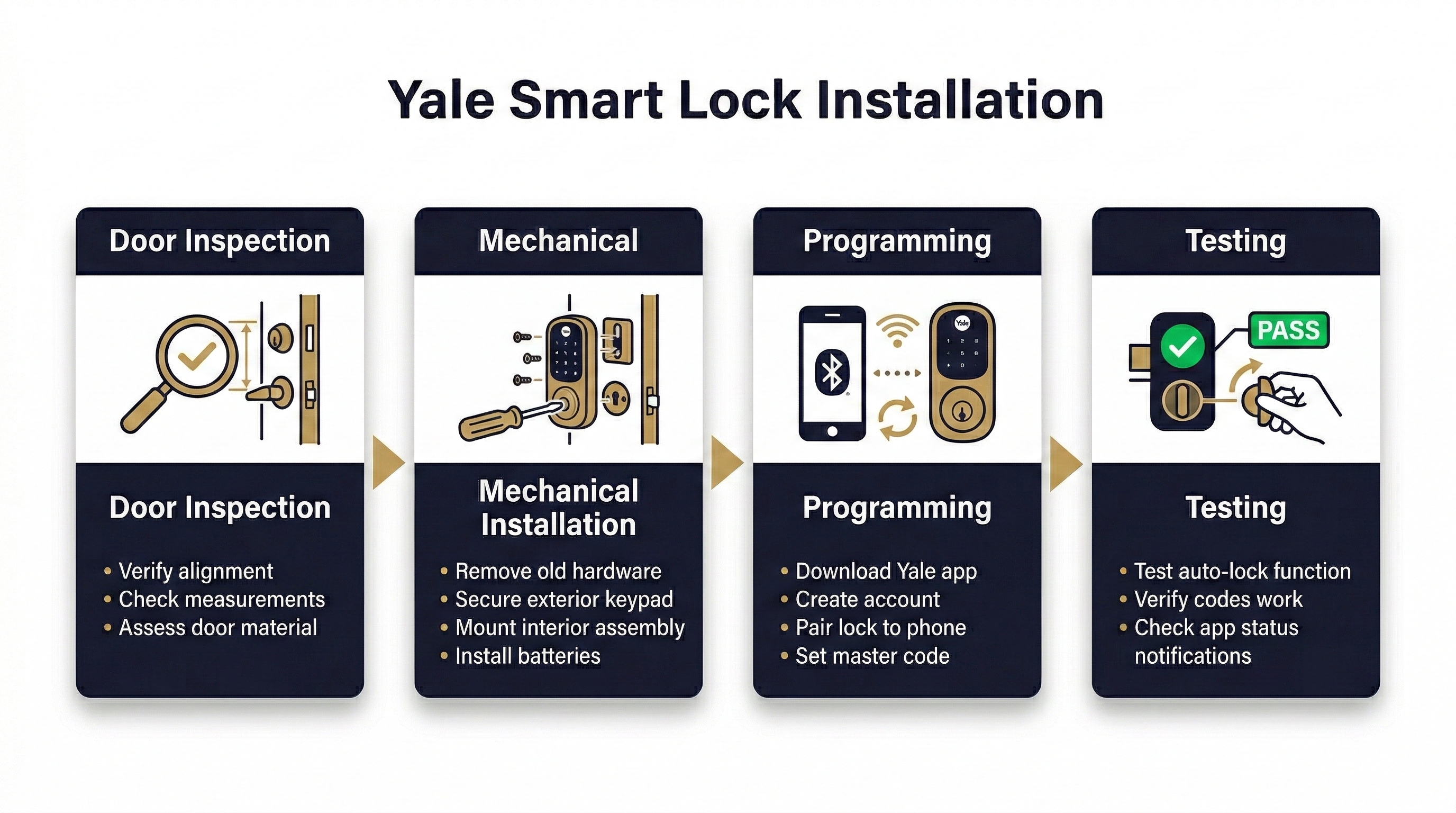
When you schedule a Yale smart lock installation in San Antonio with a qualified locksmith, the work goes well beyond simply bolting hardware to a door. The process begins with a physical inspection of the door itself. A technician checks the door material, thickness, existing bore-hole dimensions, and the condition of the frame and strike plate. If the door is warped, sagging, or if the existing hole is oversized, those issues must be corrected first — otherwise the lock motor fights against friction every time it cycles, which drains batteries and triggers error codes.
Next comes the mechanical installation: the latch assembly, strike plate with reinforced screws, and the interior-exterior cable connection that links the keypad to the motor. Every component must be aligned so the bolt slides freely into the strike pocket. After the hardware is secure, programming begins — setting a master entry code, adding individual user codes, configuring auto-lock timing if desired, and testing every method of entry the owner plans to use.
A Scenario That Illustrates Why Professional Installation Matters
Consider a San Antonio property manager who purchases a Yale Assure lock online and installs it over a weekend. The deadbolt seems to work, but within a week the lock begins displaying a “jammed” warning. The bolt is rubbing against the strike pocket because the plate was never shimmed to match the door frame. Each time the motor engages, it draws extra current pushing through that friction. Batteries that should last months are dead in weeks. A service call to diagnose and correct the alignment ends up costing more than hiring a locksmith for the original installation. This pattern is reported frequently by users who attempted self-installation without verifying door and frame geometry.
“Arrived within 15 minutes, fixed my lock in less than 10. Fast and reasonably priced.”
— Jesus H. ★★★★★
How Long Does Installation Take — and What Affects the Timeline?
A standard Yale smart lock installation on a door that already has a compatible deadbolt bore typically takes 30 to 60 minutes, including programming. However, several factors can extend that window. Metal commercial doors require different fastening techniques than wood residential doors. Doors that have settled or shifted may need the strike pocket deepened or relocated. If you need multiple user codes programmed — common for businesses with shift workers — add time for entering and verifying each code. For a new-construction door with no existing bore, expect 60 to 90 minutes to complete drilling, installation, and full Yale smart lock setup.
| Installation Scenario | Estimated Time | Common Additions |
|---|---|---|
| Existing deadbolt bore, wood door | 30 — 45 minutes | Strike-plate swap, code programming |
| Existing bore, metal commercial door | 45 — 70 minutes | Reinforced screws, frame shimming |
| No existing bore (new door or upgrade) | 60 — 90 minutes | Bore drilling, latch routing, full setup |
| Multi-lock project (2 — 4 doors, same site) | 2 — 4 hours total | Coordinated code structure, master/user hierarchy |
Do You Really Need a Locksmith, or Can You Install a Yale Lock Yourself?
Yale markets many of its smart locks as DIY-friendly, and for a standard residential door in good condition, self-installation is possible. The challenge arises when the door is not perfectly aligned, the bore dimensions are slightly off, or the internal cable gets pinched during assembly. Pinched cables can cause intermittent connectivity between the keypad and the motor, leading to unpredictable lockouts. On commercial properties, the stakes are higher: a lock that fails to engage properly is not just an inconvenience — it is a security and liability issue.
A professional locksmith brings tools and experience that eliminate guesswork. They carry bore templates, strike-plate jigs, and calibration knowledge specific to Yale hardware. At Immediate Response Locksmith, our technicians test the completed installation under real conditions before leaving the site, verifying that the bolt extends and retracts without resistance and that every programmed code works on the first attempt. That verification step alone prevents the most common post-installation complaints.
What Should You Prepare Before the Technician Arrives?
Preparation saves time and keeps the installation cost predictable. Before your appointment, photograph both sides of the door and the edge where the latch sits. Measure the door thickness — most Yale locks accommodate 1-3/8 inches to 2-1/4 inches, but confirming this in advance avoids surprises. Decide in advance which users need codes and whether you want a master/sub-user hierarchy. For businesses, having a written list of employees and their assigned access levels allows the technician to program everything in a single visit rather than scheduling a return trip.
If you are replacing an older electronic lock, have the existing master code available so the old hardware can be properly reset before removal. If you do not have the code, let the locksmith know ahead of time — removal without a code may require additional steps.
Comparing Yale Keypad Lock and Yale Smart Lock: Which Fits Your Needs?
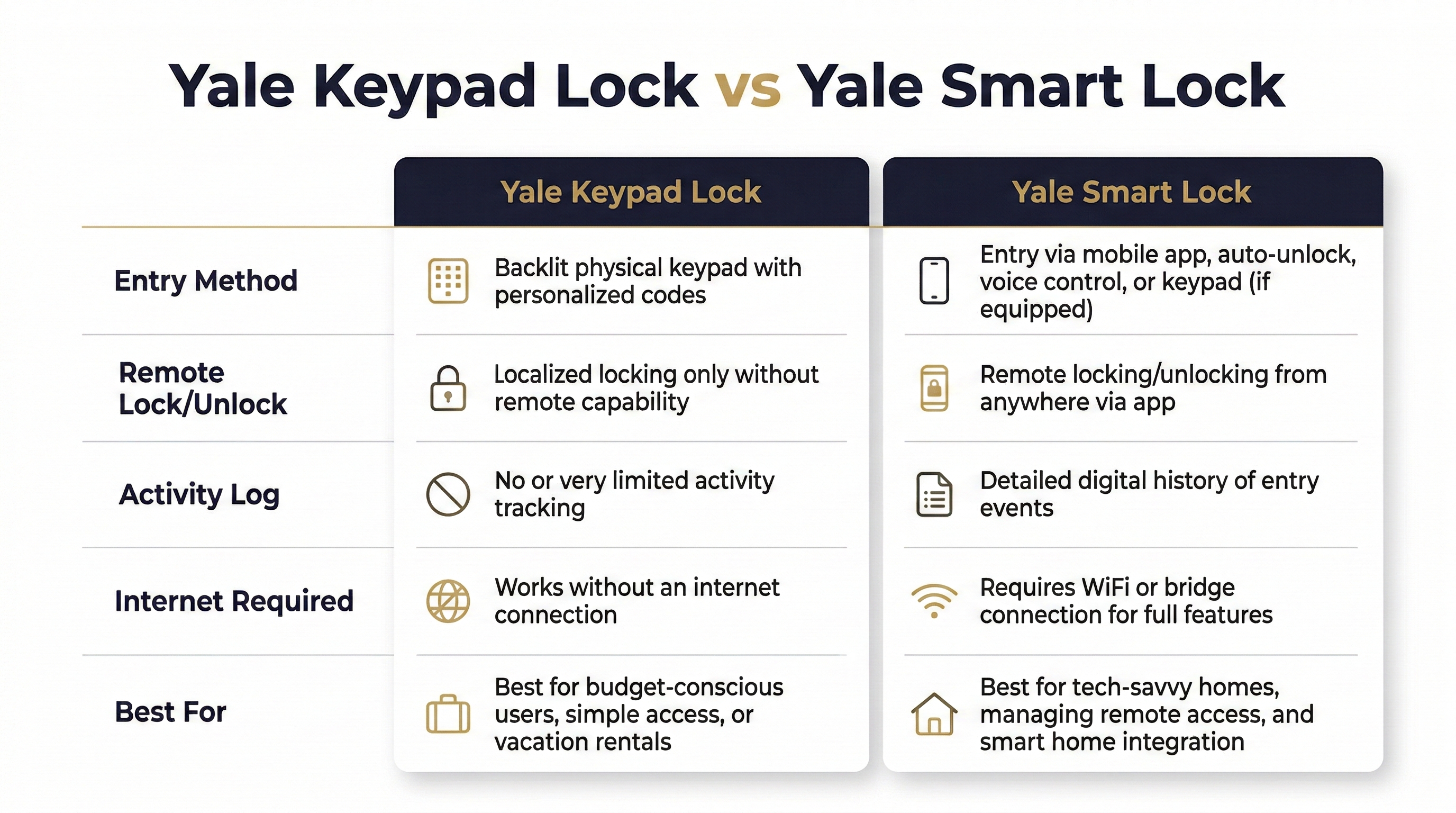
The terminology can be confusing. A Yale keypad lock allows entry via a numeric code punched into a physical keypad — no app, no internet, no Bluetooth required. A Yale smart lock adds connectivity layers: app control, remote locking and unlocking, activity logs viewable on your phone, and sometimes integration with home-automation platforms. Some Yale models combine both — the keypad works locally while the app provides remote management.
| Feature | Yale Keypad Lock (Standalone) | Yale Smart Lock (Connected) |
|---|---|---|
| Entry method | Numeric code on keypad | Code, app, Bluetooth, optional key |
| Remote lock/unlock | No | Yes (with Wi-Fi module) |
| Activity log | Limited or none | Viewable in app with timestamps |
| Internet required | No | Only for remote features |
| Best for | Simple keyless entry, no tech dependency | Remote management, multi-property oversight |
For a business that wants keyless convenience without any internet dependency, a standalone keypad lock is reliable and straightforward. For property managers who oversee multiple locations or need to grant temporary access remotely, the connected smart lock version provides more flexibility.
Does a Yale Smart Lock Work Without Wi-Fi?
Yes. The keypad on a Yale smart lock functions independently of your internet connection. If your Wi-Fi goes down — or if you choose never to connect the lock to a network at all — you can still enter and exit using your numeric code. Bluetooth connectivity, available on many Yale models, provides a short-range link to your phone for app-based unlocking even without Wi-Fi. The features that require an active internet connection are remote locking, remote code management, and push notifications. For businesses, this means that an internet outage never locks you out of your own building, which is a critical reliability factor.
“Cristin is hands-down the best locksmith I’ve ever worked with. She showed up quickly and handled a tricky lockout with total professionalism.”
— Patrick M. ★★★★★
Egress Code Compliance: A Mistake San Antonio Business Owners Cannot Afford
Installing a smart lock on a commercial property introduces a legal consideration that many business owners overlook. Life Safety Codes, specifically NFPA 101 as referenced by The Joint Commission, require that doors on a means of egress unlock from the inside without any key, tool, or special knowledge. That means the interior side of any electronic lock must allow immediate, unimpeded exit. Texas Administrative Code section 554.335 reinforces this principle for regulated facilities, prohibiting locking hardware that could delay egress in occupied areas.
A qualified locksmith configures the Yale lock so that the interior thumb-turn or lever always allows free exit, regardless of the electronic state of the lock. If your building is subject to fire-marshal inspections or ADA requirements, this detail is not optional — it is a code requirement that must be verified during installation.
Hardening Your Smart Lock Against Cyber Threats
A smart lock is only as secure as the network it connects to. If the Wi-Fi router serving your Yale lock uses default credentials, outdated firmware, or has WPS enabled, the lock’s digital security is compromised regardless of how strong the physical hardware is. The Cybersecurity and Infrastructure Security Agency (CISA) recommends disabling WPS and UPnP on routers, enabling WPA3 or WPA2-AES encryption, and updating router firmware regularly.
For the Yale Access app itself, enable multi-factor authentication if available, use a strong unique password, and avoid reusing credentials from other accounts. The Texas Department of Public Safety echoes this guidance, urging Texans to treat smart-device accounts with the same password discipline used for banking. At Immediate Response Locksmith, we walk business clients through these network-hardening steps as part of the Yale smart lock setup, because a professionally installed lock paired with a poorly secured router still leaves your property vulnerable.
Troubleshooting the Most Common Yale Smart Lock Problems
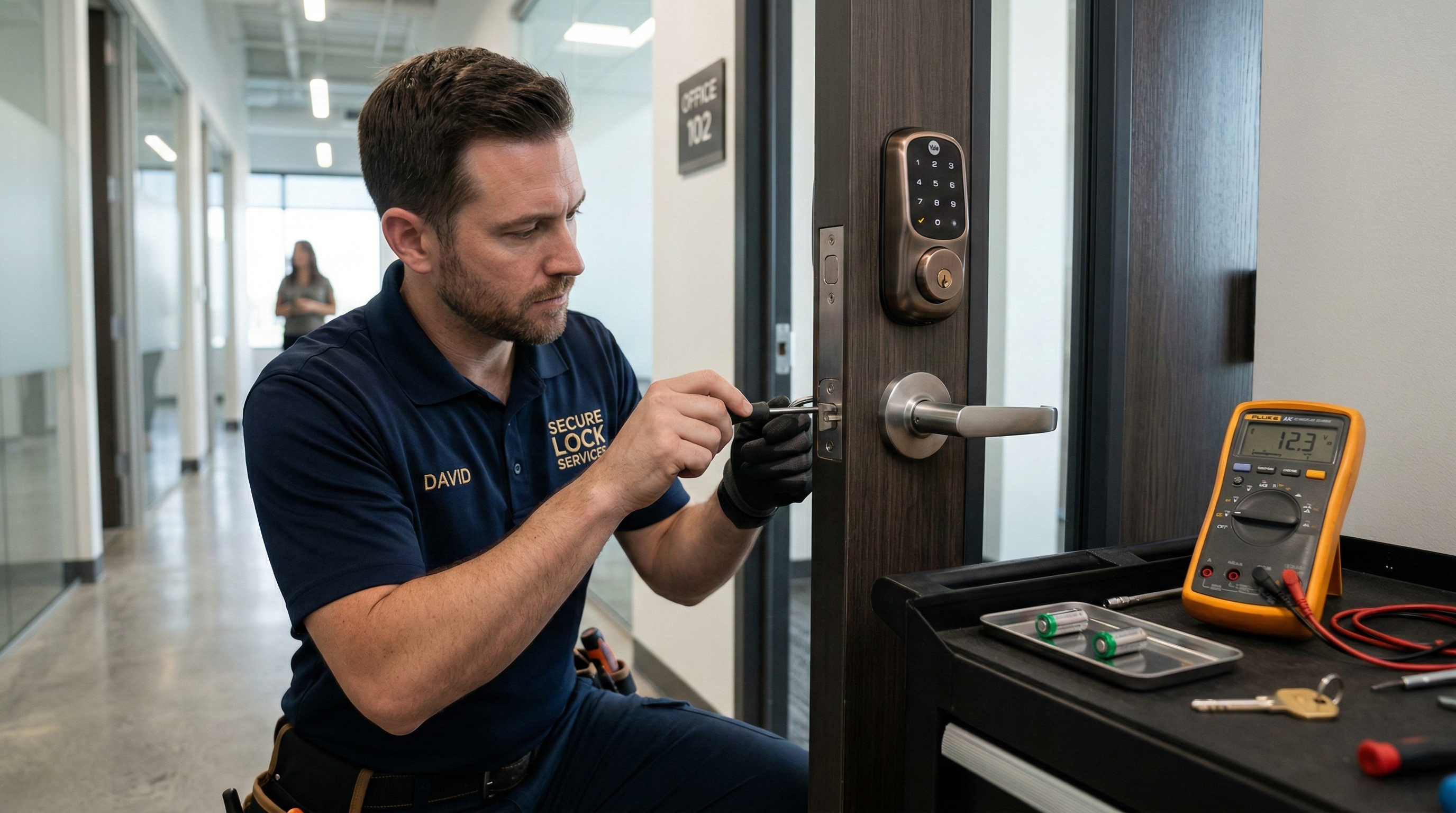
The single most reported issue after a Yale smart lock installation is the “jammed” or “blocked” alert. In nearly every case, this is not a motor failure — it is a mechanical alignment problem. The deadbolt is encountering resistance as it extends into the strike pocket, and the lock’s motor sensor interprets that resistance as an obstruction. The fix is usually adjusting the strike plate, deepening the pocket, or correcting a slight door sag that shifted the bolt path. According to Digital Trends, this same friction is a leading cause of premature battery drain in Yale Assure 2 locks.
Another common frustration involves DoorSense calibration. DoorSense is a feature that detects whether the door is open or closed. If the magnet is not positioned precisely during installation, the sensor gives false readings — telling you the door is open when it is closed, or vice versa. Recalibration through the app usually resolves the issue, but if the magnet placement is physically wrong, it needs to be repositioned on the door frame. This is one more reason why professional lock installation prevents headaches: a technician verifies DoorSense operation before leaving the site.
Battery Drain: Why It Happens and How to Prevent It
Yale smart locks run on standard AA or CR123 batteries depending on the model. Under normal conditions, battery life ranges from several months to over a year. When batteries drain significantly faster than expected, the cause is almost always mechanical — not electronic. A bolt that drags against the strike plate forces the motor to work harder on every cycle. Over dozens of daily lock-and-unlock events, that extra draw adds up quickly. Correcting the strike alignment is the single most effective way to extend battery life.
Environmental factors also play a role. Extreme San Antonio summer heat can affect battery chemistry, and locks on south-facing doors that absorb direct afternoon sun may see reduced battery performance. Using high-quality lithium batteries rather than bargain alkaline cells provides more consistent voltage in heat and extends overall lifespan.
What Immediate Response Locksmith Handles That a Generic Handyman Does Not
A general handyman can mount hardware to a door. A locksmith who specializes in Yale smart lock installation in San Antonio brings a different skill set. Our technicians understand the interaction between the lock mechanism, the door material, the frame geometry, and the electronic programming layer. We carry the tools to bore a new hole to manufacturer specification, reinforce a worn-out strike pocket, and program a multi-user code structure with master override capabilities for business owners. We also verify egress compliance, test the lock under load, and confirm that the keypad and any connected app respond correctly before closing out the job.
Immediate Response Locksmith provides same-day scheduling for most Yale smart lock installations, and our mobile service means we come to your location with all necessary equipment. For businesses that operate on tight schedules, that means minimal disruption — the lock is installed, programmed, and tested during a single visit.
| Business Need | How We Help in Practice |
|---|---|
| Multiple employee codes with turnover | Program user-level codes on-site; provide instructions for adding or removing codes after we leave |
| Door alignment issues on older buildings | Adjust or replace strike plate, shim frame, verify bolt travel before mounting lock |
| Network security concerns | Walk through router hardening and app authentication settings during setup |
| Egress compliance for inspected facilities | Verify interior free-exit function and document configuration for fire-marshal review |
| Emergency lockout after smart lock failure | 24/7 response to restore access and diagnose the malfunction on-site |
“Cristin completed the task in less than 5 minutes! Highly recommended!”
— Marcus W. ★★★★★
Need a Yale Smart Lock Installed in San Antonio?
Licensed technicians available 24/7. Same-day service for most installations.
Frequently Asked Questions
How long do batteries last in a Yale smart lock?
Under normal conditions with proper strike-plate alignment, most Yale smart locks deliver several months to over a year of battery life on a single set. If your batteries are draining in weeks, the most likely cause is bolt friction — the deadbolt is not sliding freely into the strike pocket, which forces the motor to draw extra power on every cycle. Having the installation inspected and the alignment corrected usually resolves the problem immediately.
Can I use my Yale lock if the Wi-Fi goes out?
Yes. The Yale keypad lock functions completely independently of your internet connection. You can enter your numeric code on the keypad to lock and unlock the door at any time, regardless of Wi-Fi status. Bluetooth-based unlocking via your phone also works without internet. The only features that require an active connection are remote lock/unlock commands and push notifications to your phone.
Where can I find the official Yale installation manual?
Yale publishes product manuals and installation guides through its official Download Centre. You can search by product name or model number to find the correct PDF. Having the manual available before your installation appointment helps you understand the hardware components and communicate any preferences to your locksmith.
Is a Yale smart lock safe from hacking?
No internet-connected device is immune to cyber threats, but proper configuration drastically reduces risk. Use a strong unique password for your Yale app account, enable multi-factor authentication, and secure your Wi-Fi network with WPA3 or WPA2-AES encryption. Disable WPS and UPnP on your router. These steps, recommended by CISA, create multiple layers of protection that make unauthorized digital access extremely difficult.
What happens if I forget my Yale smart lock code?
If you forget your user code but still have the master code, you can use the master code to enter and then reprogram your user code. If you have lost the master code, a factory reset is typically required — this erases all programmed codes and returns the lock to default settings. A locksmith can perform this reset on-site and reprogram your codes in a single visit.
Can a Yale smart lock be installed on any door?
Most Yale smart locks are designed for standard doors between 1-3/8 inches and 2-1/4 inches thick with a standard deadbolt bore. Doors outside this range — very thick commercial doors, narrow metal doors, or doors with non-standard hole spacing — may require adapters or modifications. A pre-installation inspection confirms compatibility before any work begins.
Ready to Upgrade Your San Antonio Property’s Access Control?
If you are considering a Yale smart lock installation in San Antonio — whether for a single office door or a multi-entrance commercial property — the fastest path to a reliable, professionally programmed system is a single call. What specific access challenges is your business facing right now? Our team is ready to assess your doors, recommend the right Yale model, and complete the installation the same day. Reach out through our contact page or call for immediate emergency locksmith assistance if you are dealing with a lockout or a malfunctioning smart lock right now.
Ready to Get Started?
15+ years serving San Antonio. Licensed, insured, and available around the clock.