
Smart Lock Battery Replacement San Antonio — How to Keep Your Keyless Lock Powered Year-Round
A smart lock offers keyless convenience, but that convenience disappears the moment the batteries die. If you live in San Antonio, you already know that triple-digit summer heat and high humidity can push electronic components harder than usual. Understanding how your smart lock draws power, recognizing low-battery warnings early, and knowing exactly how to swap batteries the right way can save you from an expensive emergency lockout. This guide walks you through every practical detail, from choosing the correct battery type to troubleshooting rapid drain, so you stay in control of your front door year-round.
Understanding Smart Lock Power Essentials
Every keyless lock depends on battery power to operate the deadbolt motor, process keypad codes, communicate with smartphone apps, and illuminate indicator LEDs. When that power drops, the lock does not simply stop working all at once. According to Kwikset’s support documentation, low batteries first cause delayed responses and connectivity issues before the lock fails completely. You might notice a sluggish deadbolt turn, a longer pause before the lock confirms your code, or Bluetooth disconnections that prevent remote control.
San Antonio’s climate adds an extra variable. Heat accelerates chemical discharge inside alkaline cells, while humidity can promote micro-corrosion on battery contacts over time. Homeowners who pair routine battery checks with broader home security maintenance through residential locksmith services often catch these issues before they turn into a lockout situation.
How Do You Know the Battery Is Running Low Before It Dies?
Most modern electronic locks provide multiple warnings before total failure. A blinking red LED on Kwikset Premis models, for example, is a standard low-battery signal that appears during normal operation. Schlage smart locks take this further by sending push notifications through the Schlage Home app, giving you advance notice directly on your phone.
Beyond brand-specific alerts, there are universal signs every homeowner should watch for. The deadbolt motor sounds strained or slower than usual. The keypad backlight appears dimmer. The lock occasionally fails to fully extend or retract the bolt. If you hear repeated beeping patterns each time you lock or unlock, that is the lock telling you it needs fresh batteries now, not next week. Ignoring these cues is the most common reason people end up needing an emergency locksmith in San Antonio late at night.
What Happens When You Ignore the Warnings Completely?
Once a smart lock battery is fully depleted, the electronic components shut down. The keypad will not respond, the app will not connect, and the motor will not move the bolt. You are effectively locked out unless your model has a physical key override slot or an external emergency power terminal. Many homeowners assume they will “get to it tomorrow,” but a dead battery at the wrong moment can mean standing outside your home in 100-degree heat with groceries in hand and no way through the front door.
The key takeaway is simple: every warning you receive is an invitation to spend two minutes replacing batteries instead of spending an hour waiting for help. Treat the first alert as your deadline, not the last one.
Step-by-Step Smart Lock Battery Replacement
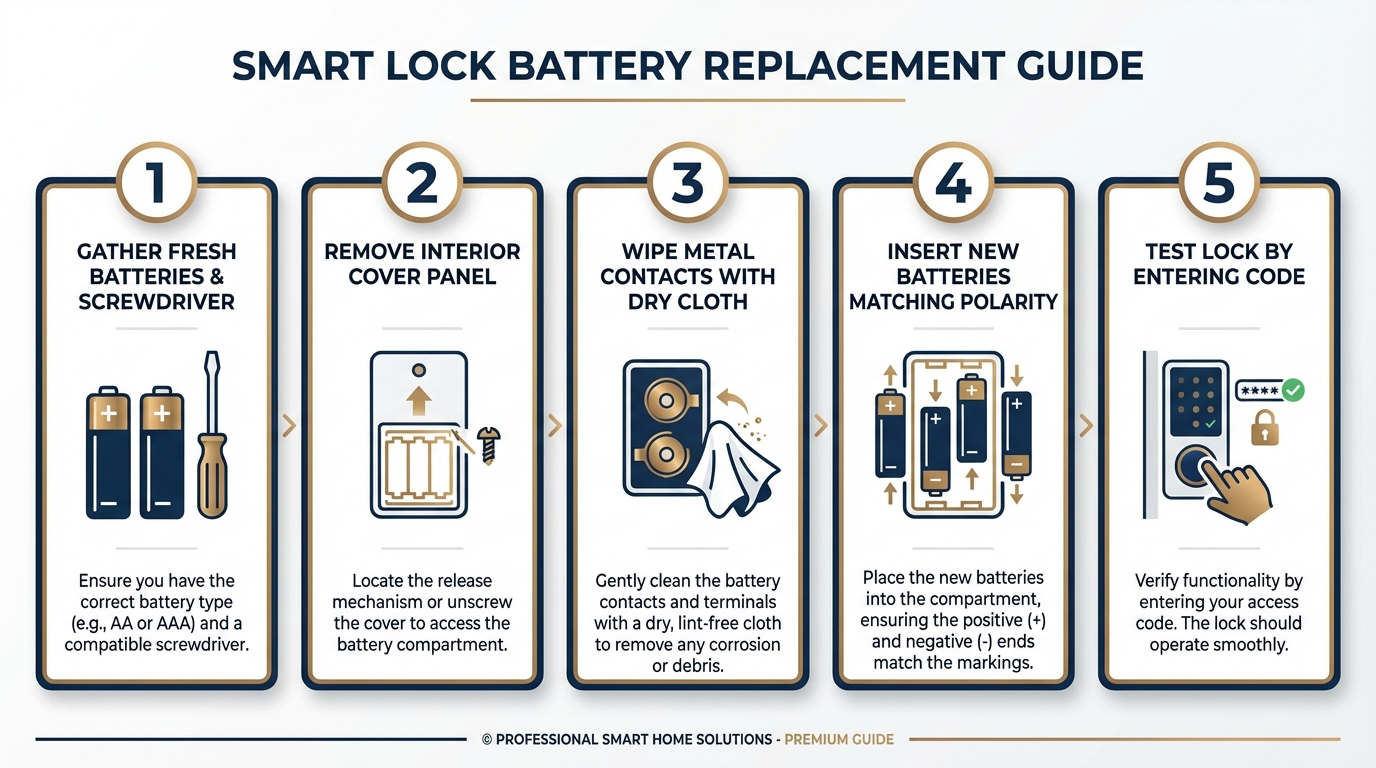
Replacing the batteries in most residential smart locks is straightforward and requires no special tools beyond what you likely already own. The process typically takes under five minutes.
Before You Start
Gather a fresh set of batteries (check your lock’s manual for the exact type, though most use four AA alkaline cells), a Phillips-head screwdriver if the battery compartment has screws, and a clean dry cloth. Make sure you are replacing the entire set at once. Mixing old and new batteries creates uneven voltage that confuses the lock’s electronics and shortens overall lifespan.
The Replacement Process
Remove the interior cover or slide-off panel on the inside face of the lock. Take note of battery orientation before removing the old cells. Wipe the metal contacts with your dry cloth to remove any dust or light corrosion. Insert the new batteries according to the polarity markings. Reattach the cover. Test the lock by entering your code or using the app to lock and unlock the deadbolt two or three times. According to Kwikset’s FAQ for the Aura model, your programmed user codes and settings are retained even when batteries are completely removed, so you do not need to reprogram anything.
If your lock uses button cell batteries in any accessory component, ensure those accessories comply with current safety standards. Federal regulations under Reese’s Law now require secured battery compartments on products with button or coin cells to protect children from accidental ingestion.
Which Battery Type Should You Choose for a Keyless Lock?
Not all AA or AAA batteries perform equally inside an electronic lock. The choice between standard alkaline and lithium can affect how long your lock runs, especially in the San Antonio climate.
| Battery Type | Typical Lifespan in Smart Lock | Best For | Heat Tolerance |
|---|---|---|---|
| Standard Alkaline (AA) | 6 to 12 months | Indoor-facing locks, moderate use | Fair — performance drops above 95 degrees F |
| Lithium (AA) | 12 to 18 months | High-use doors, extreme temperatures | Excellent — stable output in heat |
| Rechargeable NiMH (AA) | 3 to 6 months | Eco-conscious users willing to swap often | Fair — lower voltage can cause issues |
Lithium AA cells cost more upfront, but their stable voltage output and resistance to temperature extremes make them a strong choice for exterior-facing smart locks in South Texas. Rechargeable NiMH batteries deliver lower voltage per cell (1.2V versus 1.5V), which some locks interpret as a “low battery” state even when the cells are fully charged. Always check your manufacturer’s recommendation before switching types.
Why Does My Smart Lock Drain Batteries So Fast?
If you find yourself replacing batteries every few weeks instead of every several months, the problem is rarely the lock itself. The most common culprit is physical resistance. When your door is slightly misaligned or the strike plate creates friction against the deadbolt, the motor has to work significantly harder on every single lock and unlock cycle. Multiply that extra effort across dozens of daily operations for a busy household and you get rapid drain.
A quick diagnostic: open the door fully so the bolt extends freely into the air, then trigger the lock electronically. If the bolt moves smoothly and quickly, your lock is fine. Close the door gently and try again. If the bolt now sounds strained or takes noticeably longer, you have an alignment issue. Correcting the strike plate position or adjusting the door hinges often solves chronic battery drain entirely. When a DIY adjustment does not resolve the problem, professional lock installation services can realign the hardware correctly and extend your battery life dramatically.
Common Mistakes That Shorten Electronic Lock Battery Life
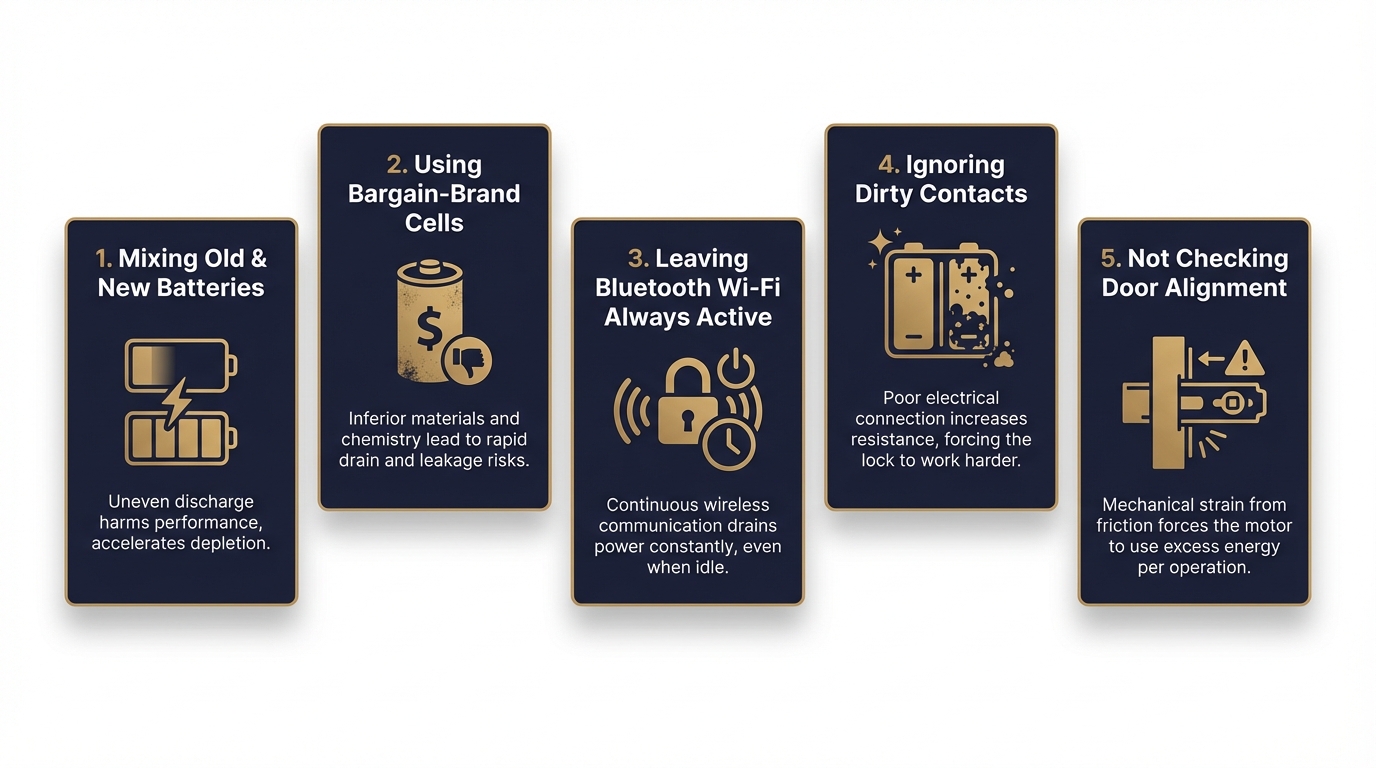
Even after installing fresh batteries, certain habits quietly drain power faster than necessary. Awareness of these errors helps you get the full expected lifespan from each set.
| Mistake | Why It Drains Batteries | Simple Fix |
|---|---|---|
| Mixing old and new batteries | Weak cells drag down strong ones, causing uneven discharge | Always replace the full set at once |
| Using bargain-brand cells | Inconsistent voltage output triggers frequent motor retries | Use reputable alkaline or lithium brands |
| Leaving Bluetooth/Wi-Fi always active | Constant radio communication draws continuous power | Disable features you do not use daily |
| Ignoring dirty contacts | Corrosion creates resistance, reducing effective power delivery | Clean contacts with a dry cloth during each swap |
| Not checking door alignment | Physical friction multiplies motor effort on every cycle | Test deadbolt with door open versus closed |
Addressing even one or two of these issues can double the interval between battery changes. Immediate Response Locksmith technicians routinely check door alignment and strike plate fit during service calls because these mechanical factors affect electronic lock reliability just as much as the batteries themselves.
What Should You Do If Your Smart Lock Dies Completely?
A fully dead smart lock does not have to mean a broken door or a drilled-out lock. Follow this priority sequence before resorting to anything destructive.
First, check whether your lock model has a physical key override. Many smart locks include a traditional keyhole hidden beneath a cover on the exterior face. If you have a backup key stored with a trusted neighbor or in a secure lockbox, use it now. Second, look for an external emergency power terminal. Several popular models feature a small port on the bottom of the exterior assembly where you can touch a standard 9V battery to temporarily power the electronics long enough to enter your code and unlock the door. Third, some newer models accept a USB-C cable connection for emergency power delivery.
If none of these options apply, or you simply do not have a backup key available, stop trying to force the lock. Prying, shimming, or drilling without the right tools and training usually damages the door, the frame, or both, turning a simple battery issue into a costly repair. This is exactly the scenario where professional house lockout assistance pays for itself. A trained locksmith can perform non-destructive entry, replace the batteries on the spot, and verify that the lock functions correctly before leaving.
Does Replacing Smart Lock Batteries Erase Your Codes and Settings?
This is one of the most common concerns homeowners have, and the answer is reassuring. In the vast majority of smart locks from Kwikset, Schlage, Yale, and other major manufacturers, all programmed user codes, scheduling rules, and connected device pairings are stored in non-volatile memory. Removing the batteries does not erase them. Once fresh batteries are installed, your existing codes should work immediately.
However, there are a few edge cases worth knowing about. Some locks require a brief recalibration of the deadbolt motor after a battery swap. This usually involves pressing a specific button sequence or running a “lock handing” process through the app. If your lock behaves erratically after fresh batteries, such as partially extending the bolt or flashing error codes, try the recalibration process described in your manual before assuming the lock is broken. Persistent issues after recalibration may indicate a hardware problem that warrants professional evaluation.
How Do Smart Locks, Keyless Locks, and Electronic Locks Differ on Battery Use?
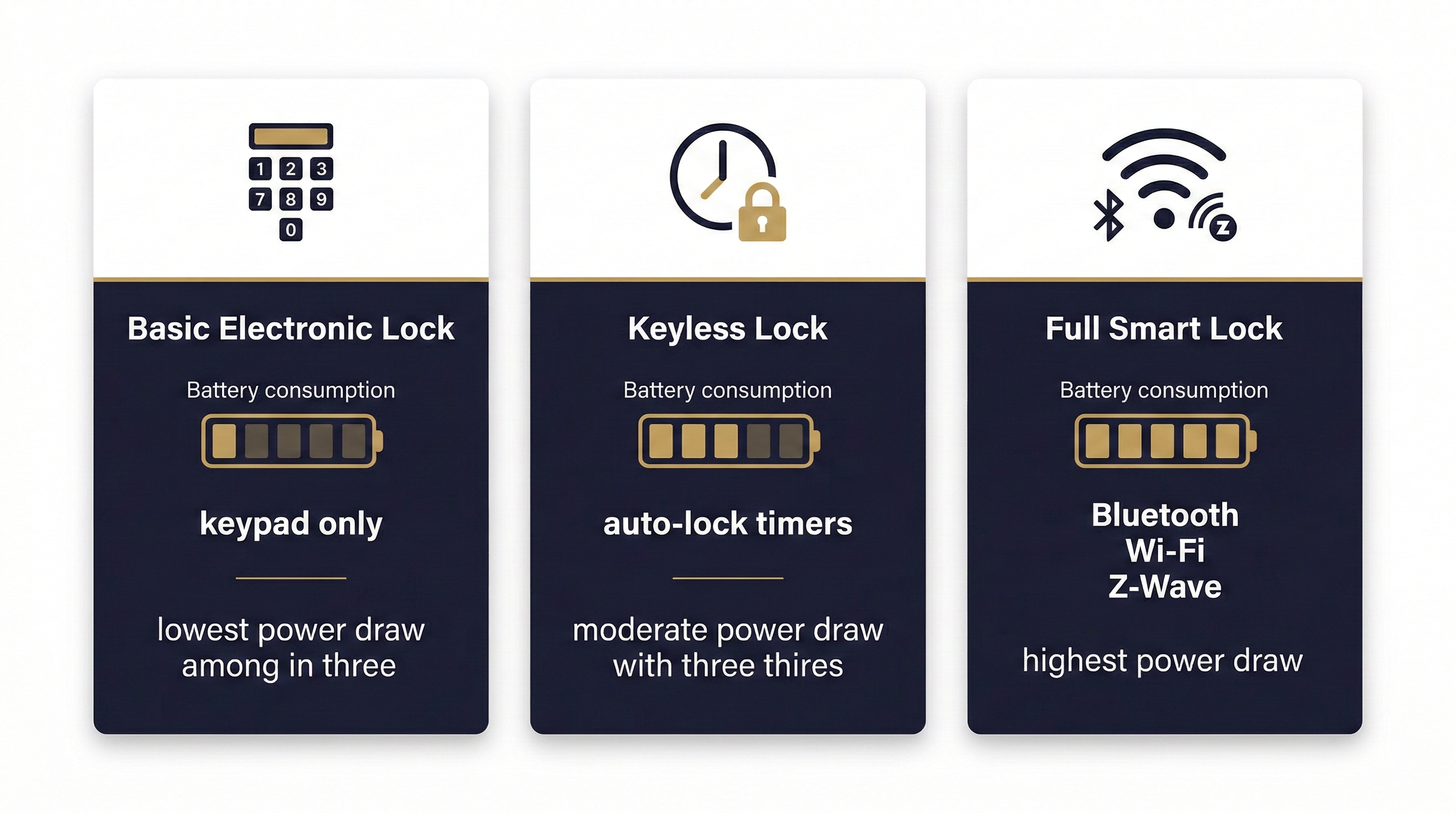
These terms get used interchangeably in everyday conversation, but they describe different technology levels, and that distinction matters for battery consumption. A basic electronic lock with a keypad and no wireless connectivity draws power only when you press buttons and activate the motor. A keyless lock may add features like auto-lock timers that periodically wake the electronics. A full smart lock with Bluetooth, Wi-Fi, or Z-Wave connectivity maintains a constant or near-constant radio signal that steadily sips power even when no one is at the door.
The practical takeaway is that the more connected your lock, the more frequently you should expect to replace batteries. Homeowners who want maximum battery life but still want keyless convenience might consider a code-only electronic deadbolt without wireless features. Those who need remote access, activity logs, and app-based guest codes should plan for shorter battery intervals and consider lithium cells to maximize uptime.
Need Smart Lock Service in San Antonio?
Licensed technicians available 24/7 for battery replacement, lock installation, and emergency lockouts.
When Should You Call a Locksmith Instead of Handling It Yourself?
Battery replacement is absolutely a DIY task for most homeowners. But several situations cross the line from simple maintenance into territory where professional help saves time, money, and stress. You should consider calling a locksmith when you are locked out with no backup key and no emergency power option. You should also call when batteries have been replaced correctly but the lock still does not respond, which may indicate a wiring issue, a failed motor, or internal circuit damage. Door and frame misalignment that causes chronic battery drain is another scenario where a locksmith’s expertise with strike plates, hinges, and deadbolt positioning resolves the root cause rather than the symptom.
Immediate Response Locksmith provides 24/7 mobile service across San Antonio, which means a technician arrives at your location with the tools and parts to diagnose the issue on site. Whether the problem turns out to be dead batteries, a misaligned strike plate, or a lock that needs full replacement, having a professional assess the situation prevents the guesswork and potential damage that come with improvised solutions under pressure.
Verifying Your Locksmith Is Licensed in Texas
Before you let anyone work on your locks, verify their credentials. In Texas, locksmith services are regulated by the Department of Public Safety under the Private Security program. Companies must hold a Security Contractor Company License, and individual locksmiths must carry valid individual locksmith registration. You can search for any locksmith’s license status through the official TOPS portal on Texas.gov.
Unlicensed operators are a real concern. Some advertise low prices online, then inflate costs once they arrive, sometimes drilling locks unnecessarily to charge for replacements. Checking licensing takes less than two minutes online and protects you from both financial and security risks.
How Immediate Response Locksmith Supports San Antonio Homeowners
| Homeowner Need | How Immediate Response Locksmith Helps |
|---|---|
| Locked out due to dead smart lock battery | Non-destructive entry with on-site battery replacement and lock testing |
| Chronic battery drain from door misalignment | Strike plate adjustment and deadbolt realignment during the same visit |
| Uncertainty about which lock or battery type to use | Product-neutral guidance based on your door, usage patterns, and budget |
| Emergency lockout at night or on weekends | 24/7 mobile response across San Antonio with transparent pricing before work begins |
| Need to upgrade from traditional to electronic lock | Full installation including alignment, programming, and battery optimization |
The difference between a frustrating lockout and a quick resolution often comes down to having a reliable, licensed locksmith you can reach at any hour. Immediate Response Locksmith focuses on fast arrival, honest assessment, and practical solutions that keep your home secure without unnecessary upselling.
Frequently Asked Questions
Can I use rechargeable batteries in my smart lock?
You can, but most manufacturers advise against it. Rechargeable NiMH cells deliver 1.2V per cell versus the 1.5V of standard alkaline. Many locks interpret this lower voltage as a “low battery” condition and may display warnings or behave inconsistently even with fully charged cells. If you choose rechargeable batteries, monitor performance closely during the first few weeks.
How long do smart lock batteries typically last in San Antonio’s climate?
Under normal residential use, standard alkaline AA batteries last roughly six to twelve months. San Antonio’s intense summer heat can reduce this by several weeks for locks on sun-exposed exterior doors. Lithium AA cells hold up better in extreme temperatures and may extend the interval to twelve to eighteen months.
Will my smart lock work during a power outage?
Yes. Smart locks run on their own internal batteries, not your home’s electrical system. A power outage does not affect the lock’s ability to lock or unlock via keypad or physical key. However, if your lock depends on a Wi-Fi hub for remote access, that hub will go offline during a power outage, disabling app control until power returns.
What is the 9V battery trick for a dead smart lock?
Some keyless locks have two metal contact points on the exterior housing, usually near the bottom. Pressing a standard 9V battery against these contacts provides enough temporary power to wake the electronics so you can enter your access code. This is a manufacturer-designed emergency feature, not a hack. Check your lock’s manual to confirm whether your model supports it.
Should I replace my smart lock if it keeps eating batteries?
Not necessarily. Rapid battery drain is almost always caused by mechanical issues like door misalignment or strike plate friction rather than a defective lock. Have a locksmith inspect the installation before investing in a new lock. A simple adjustment often solves the problem at a fraction of the replacement cost.
Is it safe to leave a smart lock with dead batteries overnight?
A dead battery means the electronic locking mechanism will not engage or disengage. If the deadbolt was in the locked position when the battery died, it typically remains locked, and the door stays secure. However, you will not be able to lock or unlock it electronically until batteries are replaced. If security is a concern, contact a locksmith for immediate assistance rather than leaving the situation unresolved.
Still unsure whether your smart lock issue is a simple battery swap or something more complex? Reach out to Immediate Response Locksmith for fast, honest guidance from a licensed San Antonio locksmith team that is available around the clock. Contact us now and get the help you need without the guesswork.
Ready to Get Started?
15+ years serving San Antonio. Licensed, insured, and available 24/7 for smart lock service, battery replacement, and emergency lockouts.