
Smart Lock Home Automation San Antonio — Installation, Voice Control, and Secure Smart Home Integration
Your front door deadbolt used to be the simplest piece of hardware in your home. Today it can talk to your phone, respond to your voice, track who enters and when, and even trigger your lights and alarm system the moment you leave. For homeowners, renters, and business owners across San Antonio, smart lock home automation is quickly moving from a luxury upgrade to a practical security decision. Understanding how the technology works, what local rules apply, and why professional installation matters will help you make the right choice the first time.
How Did Traditional Deadbolts Evolve into Smart Home Security Hubs?
A decade ago, upgrading your lock meant choosing between a single-cylinder and a double-cylinder deadbolt. The biggest decision was brass versus nickel finish. That world has changed. Modern smart locks combine a physical locking mechanism with wireless connectivity, user-specific access codes, real-time activity logs, and the ability to participate in whole-home automation routines. The deadbolt is no longer just a barrier — it is the starting point of a connected security ecosystem.
For busy San Antonio families juggling school drop-offs, service appointments, and pet sitters, keyless entry eliminates the hidden-key-under-the-mat risk entirely. You assign temporary codes that expire after a set window, receive push notifications the moment a code is used, and revoke access remotely if plans change. Homeowners who are already exploring residential locksmith services often discover that upgrading to a smart lock during a rekey or deadbolt replacement costs only marginally more than a traditional swap — with significantly more functionality.
“Cristin is hands-down the best locksmith I’ve ever worked with. She showed up quickly and handled a tricky lockout with total professionalism.”
— Patrick M., Verified Google Review
What Happens When You Ask Alexa to Lock the Front Door?
Alexa lock control gives you the ability to check lock status and send a lock command entirely through voice. You might be putting groceries away and say “Alexa, lock the front door,” and within seconds the deadbolt engages. Status checks work the same way: “Alexa, is the front door locked?” returns a clear yes or no. This hands-free convenience is especially useful when your arms are full or you are already in bed for the night.
However, there is a critical security distinction most marketing pages skip. While locking via voice is straightforward, unlocking via voice is intentionally restricted on most platforms. Amazon’s official developer documentation explains that sensitive actions such as unlocking require PIN confirmation — a spoken 4-digit code that adds an authentication layer. The reason is simple: anyone within earshot of your Echo device, including someone outside an open window, could otherwise say “Alexa, unlock the front door.” Platforms like Alarm.com and SwitchBot enforce the same PIN-protected “Secure Commands” policy to prevent unauthorized voice-activated entry.
Setting Up Google Home Lock Control: A Scenario Most Homeowners Overlook
If your household runs on the Google Nest ecosystem, integrating a smart lock through Google Home offers similar benefits with a slightly different workflow. You add the lock as a device inside the Google Home app, assign it to a room, and then build Routines around it. A popular San Antonio example: a “Good Night” routine that locks all doors, sets the thermostat to 74 degrees for a Texas summer night, arms the security system, and turns off downstairs lights — all triggered by a single phrase.
One common frustration homeowners report is that the “unlock” option does not always appear in the Google Home interface. This is not a glitch. Google enforces strict security policies that may require Voice Match verification or a spoken PIN before an unlock command is processed. If your lock manufacturer has not enabled PIN-based voice unlocking, the option simply will not show. Understanding this upfront prevents the disappointment of buying a lock expecting full voice control, only to find that half the commands are restricted.
Comparing Communication Protocols: Which Technology Fits Your San Antonio Home?
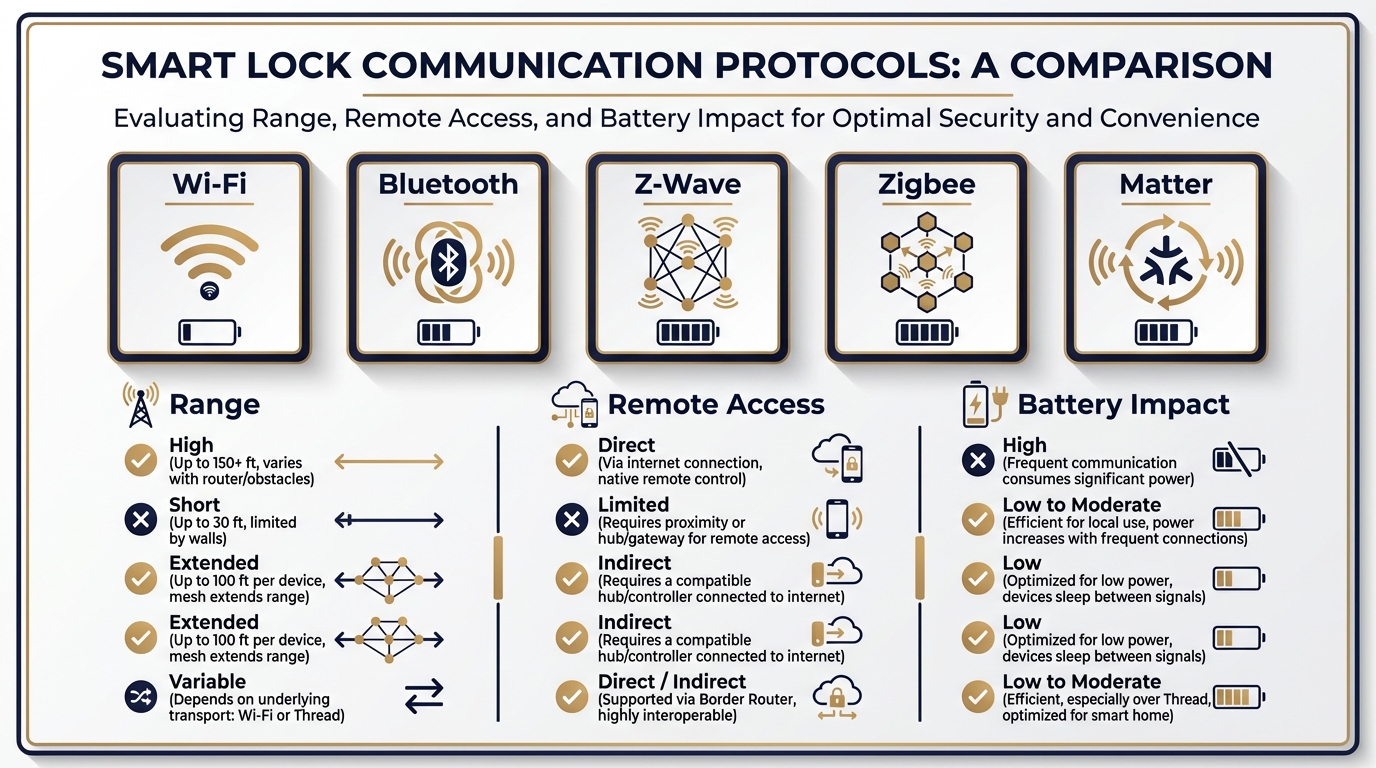
| Protocol | Range | Remote Access | Battery Impact | Best For |
|---|---|---|---|---|
| Wi-Fi | Depends on router signal at door | Yes, direct | Higher drain | Standalone smart lock users who want app control without a hub |
| Bluetooth | Short (typically under 30 feet) | No (unless paired with a bridge) | Low | Apartment dwellers or simple setups |
| Z-Wave | Medium (mesh network extends range) | Yes, via hub | Low | Homes with existing Z-Wave hubs and multiple devices |
| Zigbee | Medium (mesh network) | Yes, via hub | Low | Homes integrated with platforms like SmartThings or Hubitat |
| Matter (Thread) | Medium-high (mesh and IP-based) | Yes, via Thread border router | Low-medium | Future-proof setups wanting cross-platform compatibility |
San Antonio homes come in all sizes, from compact condos near the Pearl to sprawling properties in Stone Oak. In larger homes, Wi-Fi signal strength at the front door can be weak, leading to intermittent connectivity and missed lock/unlock confirmations. A hub-based protocol like Z-Wave or Thread often delivers more reliable performance because the mesh network extends through other smart devices in the house. Before purchasing any hardware, testing your Wi-Fi signal at the exact door location is a simple step that prevents frustration later.
A Common Mistake: Ignoring San Antonio Alarm Permit Requirements
Many homeowners connect their new smart lock to a monitored alarm panel without realizing that San Antonio requires an alarm permit issued by the San Antonio Police Department. This applies to burglar alarms, panic alarms, and integrated systems where a lock trigger can set off an alarm response. The SAPD Alarm Response and Permits page outlines the registration process, permit fees, and homeowner responsibilities.
Why does this matter for a smart lock? If your automation routine includes “door forced open, trigger alarm, dispatch,” an improperly installed lock that sends false signals could generate repeated false alarm dispatches. In 2024, local reporting by KSAT highlighted proposals to increase false alarm fees for unregistered security systems in San Antonio. A professional installation that calibrates sensor sensitivity, verifies deadbolt alignment, and tests automation triggers before going live is the most practical way to avoid these fines entirely.
What Does a Cybersecurity Hardening Checklist Look Like for a Smart Lock?
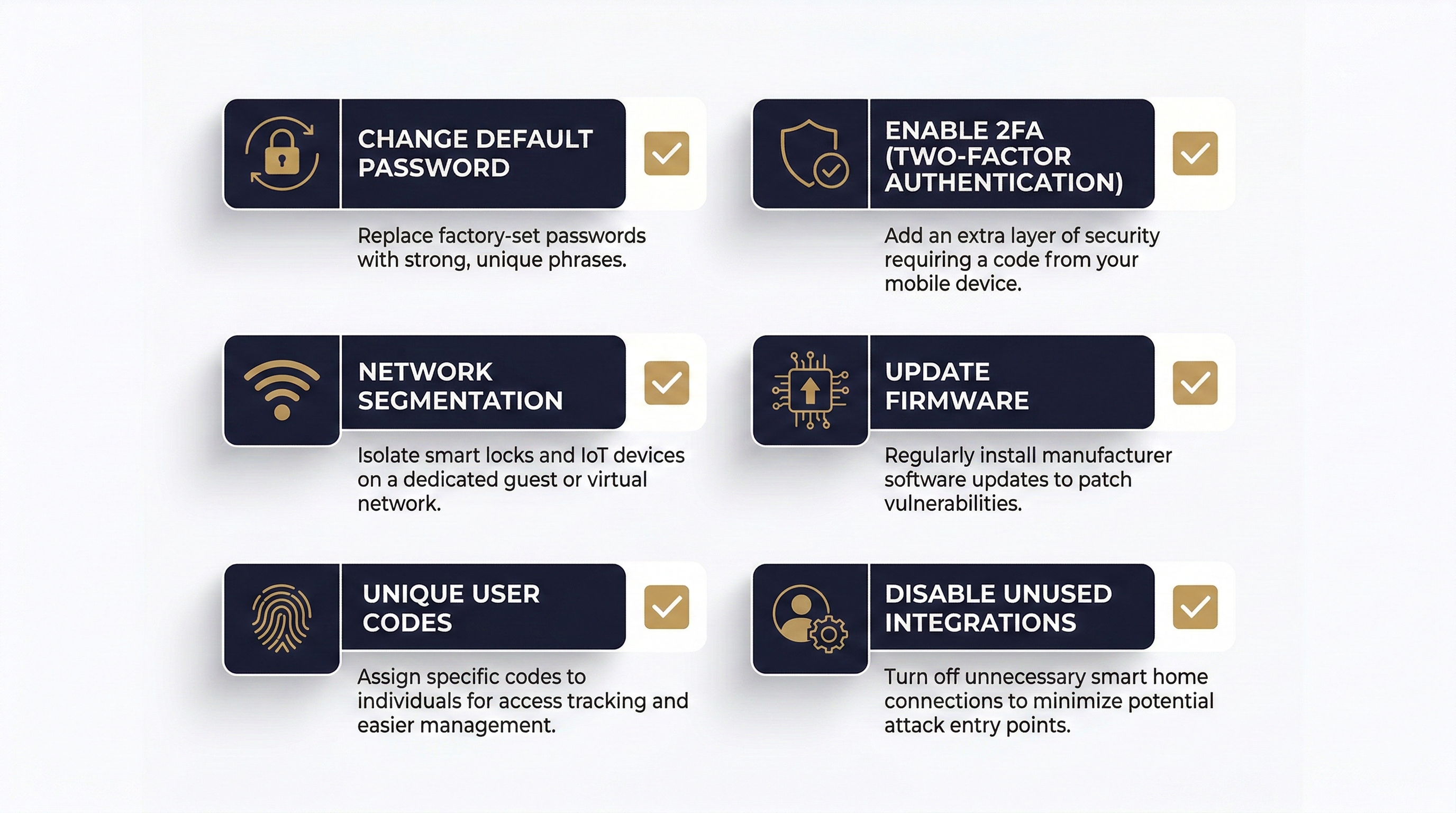
A smart lock is an IoT device, and every IoT device inherits the security posture of the network it connects to. The NIST cybersecurity blog offers practical guidance that applies directly to smart door locks: change every default password, enable two-factor authentication when available, keep firmware updated, and disable features you do not use. CISA’s home network security standards reinforce the same principle — your lock is only as safe as your router’s configuration.
| Security Action | Why It Matters for a Smart Lock | When to Do It |
|---|---|---|
| Change default admin password on lock app | Prevents unauthorized account access | During initial setup |
| Enable 2FA on the lock manufacturer’s cloud account | Blocks remote hijacking even if password is compromised | During initial setup |
| Place smart lock on a separate Wi-Fi network (guest SSID) | Isolates the lock from laptops and phones if one device is infected | Before connecting the lock to your network |
| Update lock firmware when prompted | Patches known vulnerabilities | Ongoing — check monthly |
| Use unique codes per user instead of a shared master code | Enables accurate activity tracking and easy revocation | During user onboarding |
| Disable unused voice assistant integrations | Reduces attack surface | After deciding which assistant you actually use |
Network segmentation may sound technical, but most modern routers allow you to create a guest network in under five minutes. Keeping your smart lock and other IoT devices on that isolated network means a compromised laptop on your main network cannot reach the lock’s local interface. This single step significantly reduces your exposure.
Why Is Licensed Professional Installation Required in Texas?
Texas does not treat locksmith work as an unregulated trade. The Texas Department of Public Safety classifies Locksmiths and Electronic Access Control Device Installers as regulated professions under the Private Security program. Anyone installing, servicing, or maintaining electronic locks for compensation must hold the appropriate individual license. You can verify a provider’s credentials directly through the Texas DPS licensing portal.
This matters for two practical reasons. First, an unlicensed installer who damages your door frame or misconfigures the lock may have no insurance to cover the repair. Second, a poorly aligned smart lock creates physical friction that drains batteries two to three times faster than normal, leading to unexpected lockouts when the battery dies. When that happens at 2 a.m., you need a provider who can respond quickly. Immediate Response Locksmith offers emergency locksmith services in San Antonio that cover smart lock malfunctions alongside traditional lockout situations — so a software glitch or dead battery does not leave you stranded.
“Arrived within 15 minutes, fixed my lock in less than 10. Fast and reasonably priced.”
— Jesus H., Verified Google Review
Selecting the Right Hardware for Your San Antonio Property
San Antonio’s climate plays a larger role in hardware selection than most buyers expect. Summer temperatures regularly exceed 100 degrees, and humidity can spike during monsoon season. Cheap plastic housings and low-grade finishes degrade faster under UV exposure and moisture. Look for locks with ANSI/BHMA Grade 1 or Grade 2 ratings and metal construction designed for exterior use. The communication protocol matters too: if you already own a smart home hub, choosing a lock that matches your existing ecosystem (Z-Wave, Zigbee, or the newer Matter standard) avoids the cost of additional bridges and reduces connection points that could fail.
Smart home integration also adds measurable value. Appraisers and real estate agents in the San Antonio market increasingly note connected security features as selling points. A lock that ties into lighting, cameras, and climate automation makes your property more attractive to tech-savvy buyers down the road.
Can You Keep Your Existing Key and Still Go Smart?
Yes. Many smart lock models are designed as hybrid devices — they accept a traditional key on the exterior while offering a keypad, fingerprint reader, or app control as the primary entry method. This is particularly valuable for households where some members prefer physical keys and others want to go fully digital. It also provides a reliable backup if the lock’s electronics fail or the battery dies unexpectedly.
From an installation perspective, keeping a physical key option means the locksmith ensures the mechanical cylinder is functioning smoothly alongside the electronic components. Immediate Response Locksmith handles this dual setup routinely, testing both the digital and mechanical pathways before leaving the job site. That attention to detail eliminates the frustrating scenario where the app works perfectly but the backup key sticks in the cylinder.
What Really Happens When the Smart Lock Battery Dies?
Most smart locks send low-battery alerts weeks before they actually die. The notifications appear in the lock’s app and, if connected to a voice assistant, can be announced during status checks. When the battery does reach zero, the lock typically remains in its last state — locked or unlocked. High-quality models include a physical key override or an emergency micro-USB or 9V contact on the exterior that provides just enough power to operate the motor once.
The real danger is not a sudden death. It is a slow decline caused by a misaligned deadbolt. If the bolt has to push harder than designed to fully extend into the strike plate, the motor works overtime on every cycle. In San Antonio, seasonal wood expansion from humidity changes can shift door alignment enough to create this friction. A professional installer checks and adjusts alignment as part of the setup, and a periodic maintenance visit can catch drift before it becomes a battery-draining problem.
Which Automations Deliver the Most Value in a San Antonio Smart Home?
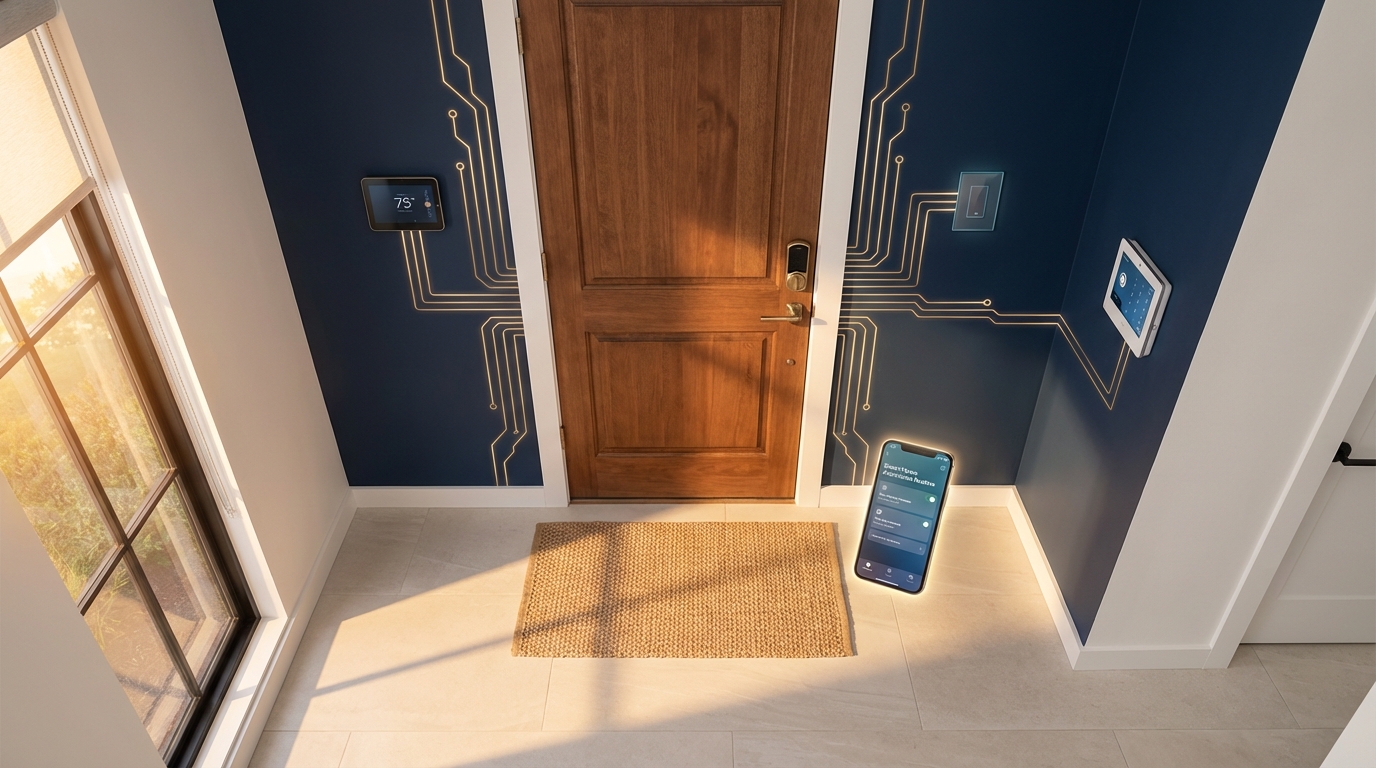
Not every automation is equally useful. The ones that consistently earn praise from homeowners are the routines that eliminate human error. An auto-lock that engages 60 seconds after the door closes means you never wonder halfway to work whether you locked up. A “Leaving Home” routine that locks the door, sets the thermostat up a few degrees, turns off interior lights, and arms the security system saves energy and improves security in a single trigger. A “Returning Home” routine tied to your phone’s geofence can unlock the door, adjust the AC back down, and turn on the porch light as you pull into the driveway.
For rental property owners — a growing segment in San Antonio’s strong short-term rental market — time-limited access codes are transformational. You generate a code that works only during a guest’s reservation window and expires automatically at checkout. No physical key handoff, no rekeying between guests, and a full log of every entry and exit. Immediate Response Locksmith regularly installs and configures these setups for property managers who need a system that is reliable, easy to manage, and backed by fast local support when something needs adjustment.
“Yvette was an absolute lifesaver. Kind, patient, and genuinely cared.”
— Desaray S., Verified Google Review
DIY Installation Versus Professional Setup: Where Things Go Wrong
Online tutorials make smart lock installation look like a 15-minute project. For a standard door with a standard backset and a perfectly plumb frame, that estimate might be accurate. In practice, many San Antonio homes — especially older properties near downtown or in established neighborhoods like Alamo Heights — have non-standard door thicknesses, worn strike plates, or frames that have shifted over decades. Forcing a smart lock onto a misaligned door voids the warranty, creates the battery-drain friction described earlier, and can even damage the lock’s internal motor on the first day.
A professional locksmith measures the door, verifies the backset dimension, inspects the frame and strike plate, and makes adjustments before mounting the lock. The electronic setup follows: pairing the lock to the app, configuring user codes, connecting to Wi-Fi or a hub, linking to Alexa or Google Home, and running a full test cycle. That process takes longer than 15 minutes, but it produces a lock that works correctly from day one.
Practical Needs and How Immediate Response Locksmith Addresses Them
| Common Need | How It Is Handled in Practice |
|---|---|
| Emergency lockout from a smart lock failure at night | 24/7 mobile response with tools and knowledge for both electronic and mechanical bypass |
| Upfront pricing before any work begins | Phone-based diagnosis and clear cost estimate provided before the technician starts |
| Compatibility assessment for an existing door | On-site measurement of backset, door thickness, and frame condition before recommending hardware |
| Multi-property smart lock rollout for rental owners | Consistent configuration, code management guidance, and ongoing support across multiple units |
| Alarm system integration and permit guidance | Coordination with alarm setup to reduce false triggers and advice on SAPD permit registration |
Before You Activate Voice Control: A Security Pre-Check
Enabling Alexa or Google Home to interact with your lock is exciting, but doing it without preparation creates unnecessary risk. Before you link accounts, confirm that your lock manufacturer supports PIN-based voice unlocking — or decide that you are comfortable with voice locking only (no voice unlock). Enable the secure commands feature on whichever automation platform you use. Review which household members or voice profiles have permission to issue lock commands, and remove any profiles that should not have access.
If you have roommates, an Airbnb listing, or a shared household, consider whether voice-controlled locking even makes sense for your situation. In some cases, app-only control with individual user codes is more secure and more auditable than voice commands that any recognized voice profile can issue.
Need Smart Lock Installation in San Antonio?
Licensed technicians available 24/7. Professional assessment, expert installation, and full smart home integration.
Frequently Asked Questions
Can a locksmith install a smart lock, or do I need an electrician?
A licensed locksmith is the correct professional for smart lock installation. In Texas, Electronic Access Control Device Installers are licensed through the Department of Public Safety. No electrical wiring is typically involved because smart locks run on batteries and connect wirelessly.
Do smart locks work if my Wi-Fi goes down?
Yes. The physical keypad, fingerprint reader, or mechanical key backup will continue to function regardless of internet status. You lose remote access and notifications until connectivity is restored, but the lock itself remains fully operational at the door.
Are smart locks safe from hacking?
When properly configured — unique passwords, firmware updates, network segmentation, and disabled unused features — smart locks from reputable manufacturers meet strong security standards. The weakest link is usually the home network or reused passwords, not the lock hardware itself.
What is a fair price for smart lock installation in San Antonio?
Pricing depends on door condition, lock model, and whether additional adjustments (strike plate, frame reinforcement) are needed. A reputable locksmith provides a clear estimate before starting work. Be cautious of providers who refuse to quote a price over the phone or add charges after arrival without explanation.
Can I use the same smart lock for my home and my business?
Residential-grade smart locks are designed for lighter traffic. Commercial properties with higher daily entry counts benefit from commercial-grade electronic access control that handles more users, offers audit trails, and meets ADA requirements. Explore commercial smart security solutions for properties with heavier access demands.
What happens if I sell my home — can the new owner take over the smart lock?
Yes. A factory reset clears all previous codes, user accounts, and automation links. The new owner sets up the lock fresh. It is important to perform this reset before handing over keys to ensure no residual access remains on the previous owner’s app. Under Texas Property Code Section 92.156, landlords are already required to rekey locks between tenants — a factory reset on a smart lock serves the same purpose for digital access.
Ready to Upgrade Your San Antonio Home with a Smart Lock?
15+ years serving San Antonio. Licensed, insured, and available around the clock. Professional assessment, expert installation, and ongoing support.